Can't Sign In? Fixes For DM Play Login And Password Trouble
Three things cause most DM Play login trouble: a phone number entered in the wrong format, a typo in the password, or an outdated link that doesn’t lead to the correct page. Your phone number or email registered with the account, along with the password, gets you in. If you’ve lost the password, only customer service can reset it.
Below you will find the exact sign-in steps, the most common reasons the login page refuses you, and what to do before you message support. If you are 18+ and playing with real money, keep your password safe, because the same password is also asked when you withdraw.
How Does DM Play Login Work With Phone Or Email?
To log in on DM Play, enter the phone number or email attached to your account, type your password and press Log in. No separate username exists, so the number you registered with serves as your ID for the login form.
Use the app on your phone or the DM Play mobile website. Old bookmarks from other sites often lead to copies, so open the address fresh.
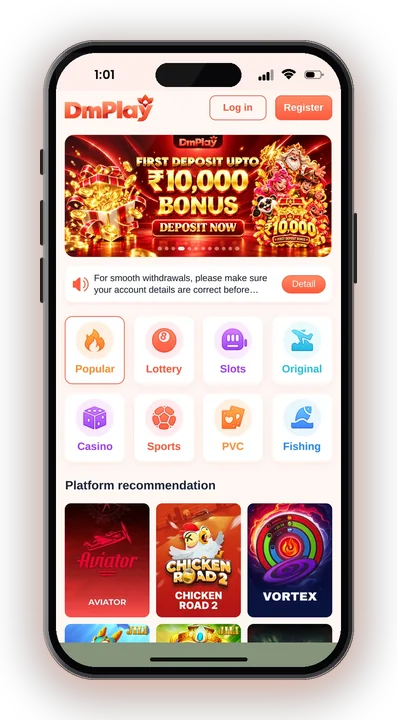
Choose the tab that matches what you registered with. A phone account will not open from the email tab.
Type the 10-digit mobile number without spaces or an extra 0 in front. For email, check the spelling of the domain.
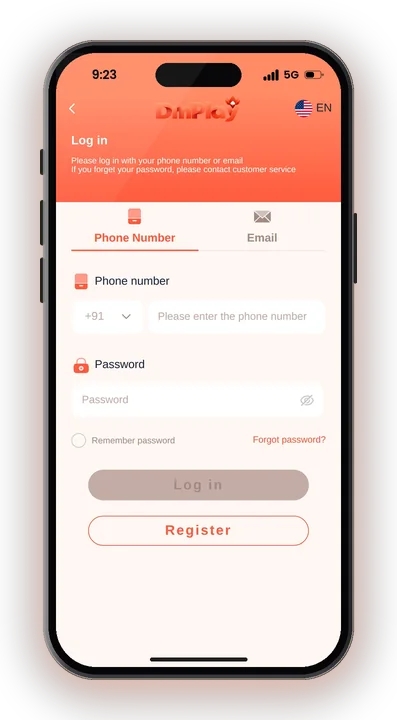
Enter the password you set when you created the account. Tap the eye icon to see it before you submit.
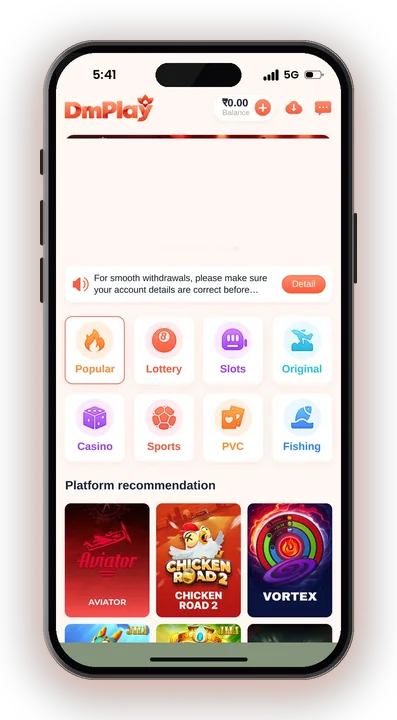
You land on the home screen with your Balance at the top. If nothing happens, wait a few seconds before tapping again.
No account yet? Follow the registration steps first, since logging in only works once your number is registered with a password.
Forgot Your DM Play Password? How To Reset It
If you forget your password, you have to contact customer service to get it reset. There is no instant self-reset to lean on, so plan for a short wait on your login recovery.
What To Send Customer Care
Give the registered phone number or email, and if you can, your user ID and the date of your last deposit. These details help them confirm the account is yours.
Never send your full UPI PIN or bank OTP. A real support agent does not need either to reset a game password.
Setting A Stronger New Password
Accounts are created with a 6-character password, which is short. Once you are back in, choose something you do not use on Gmail, Facebook or your banking apps.
Write it down somewhere private. Remember you type this same login password when you place a withdrawal, so losing it again also blocks your money.
Why Is DM Play Login Not Working? Common Causes
Most failed sign-ins here are caused by input mistakes or a bad link, not a blocked account. Work through these login checks before you assume something is wrong on the platform side.
Wrong Number Or Wrong Tab
People often register with one SIM and try logging in with another. Others type a country code or a leading 0 when the field only wants 10 digits.
Also check you are on the phone tab if you signed up with a number, not email.
Password Typed Incorrectly
Autocorrect on Android keyboards capitalises the first letter. Turn on the eye icon and read the password before tapping Log in.
Pasting a password from your notes may bring along an invisible trailing space, and that alone can make the right password get rejected.
Fake Or Outdated Website
Copy sites look the same as the real page but simply steal what you type. If the page asks for an OTP, close it.
Go back through the DM Play Official address and save that bookmark instead.
Weak Internet Or Old Cache
A slow mobile network makes the button spin with no result. Switch between Wi-Fi and data, then try again.
On the mobile website, clearing browser cache or opening in a fresh tab often fixes a page stuck on loading.
Login Trouble In The DM Play App Vs Mobile Website
The app and the mobile site share a single account, so your registered phone number and password will work on both. If you can’t log in on one, open the other. This helps you work out whether the login problem is with your account or just with that one screen.
To install, tap the download icon in the upper right corner of the site, or use the icon option to Add to Desktop for a shortcut. The full process to get the app on Android covers phones that block unknown installs.
If the app opens to a blank screen, delete it and install again from the site. Your Balance stays safe because it is stored on the account, not on your phone, so a login after reinstalling shows the same funds.
Do DM Play Hack Or Password Tools Work?
No hack exists, and any app claiming to crack passwords or predict Win Go results is a scam. These tools usually ask you to log in through them, which hands your DM Play login password to a stranger.
Once someone else has your DM Play login details, they can add their own bank account and request a withdrawal. Win Go, K3 and 5D results are random, so no predictor can know the next number either.
Placing bets on both Big and Small, or Red and Green, in the same round is counted as illegal betting under the platform rules. Using such tricks can lead to DM Play login account problems, so stay away from Telegram groups selling them.
How Login Details Link To Withdrawals And Your Bank Name
Your DM Play login password is also the password you enter to confirm a withdrawal, so anyone who knows it controls your money too. That is the main reason to keep it private.
Account Name Locks After First Save
The name attached to your first saved withdrawal account is locked once it is saved. Every UPI ID or bank account you link later must be in that very same name.
If someone else logged in and saved their name first, you would struggle to withdraw to your own bank, so act fast if you notice unknown activity.
Check Withdrawal Rules After Logging In
UPI and USDT withdrawals are allowed between 00:00 and 23:55, up to 3 times a day. For timing issues, read about sending winnings to your bank.
Safety Tips To Protect Your DM Play Login
A few habits keep your account yours. The app only accepts players above 18, and real-money games carry the risk of losing what you deposit, so protect both your DM Play login and your playing budget.
- Use one bookmark: Bookmark the genuine address one time and enter the site only through that bookmark, never through links that people forward to you.
- Never share your password: Not with friends, uplines in an Invite Code group, or anyone claiming to be support on WhatsApp.
- Log out on shared phones: If you sign in on a family member’s phone, log out and do not let the browser save the password.
- Watch your Balance: Check your Balance and bank list after each login. A new bank account you did not add is a warning sign.
- Set a fixed budget: Decide on a modest limit before each session and stop once you hit it. Results are down to chance, and the laws on real-money gaming differ from one state to another, so check what applies in your own state.
DM Play Login – FAQs
Can I log in to DM Play with email instead of phone number?
Yes, if your account is linked to an email. Choose the email option on the login page and enter the same password. If you only registered with a phone number, use that.
How do I reset my DM Play password?
Contact customer service with your registered number or email. They will help you get back in, and you should set a new, stronger password right after.
Why does DM Play say wrong password when it is correct?
Usually a capital letter from autocorrect, a hidden space after pasting, or the wrong phone number. Show the password with the eye icon and check the number has 10 digits.
Is it safe to use a DM Play hack app to recover my account?
No. Hack tools and predictor apps are frauds designed to steal your login details. If you’ve forgotten your password, you can only recover it by contacting customer support.
Final Words
Most DM Play login failures fix themselves once you use the right number, check the password carefully and open the real website or app. For a forgotten password, go to customer service and nowhere else.
Keep your password to yourself, since it can also approve withdrawals. Play only if you are 18 or older, and stake only money you can afford to lose.