Minimum Deposit, UPI And Other Ways To Recharge DM Play
A DM Play deposit starts from ₹100 through UPI, and you can add up to ₹50,000 in one UPI order. The platform lists six recharge ways on its deposit page, and they all come down to two methods: UPI and USDT.
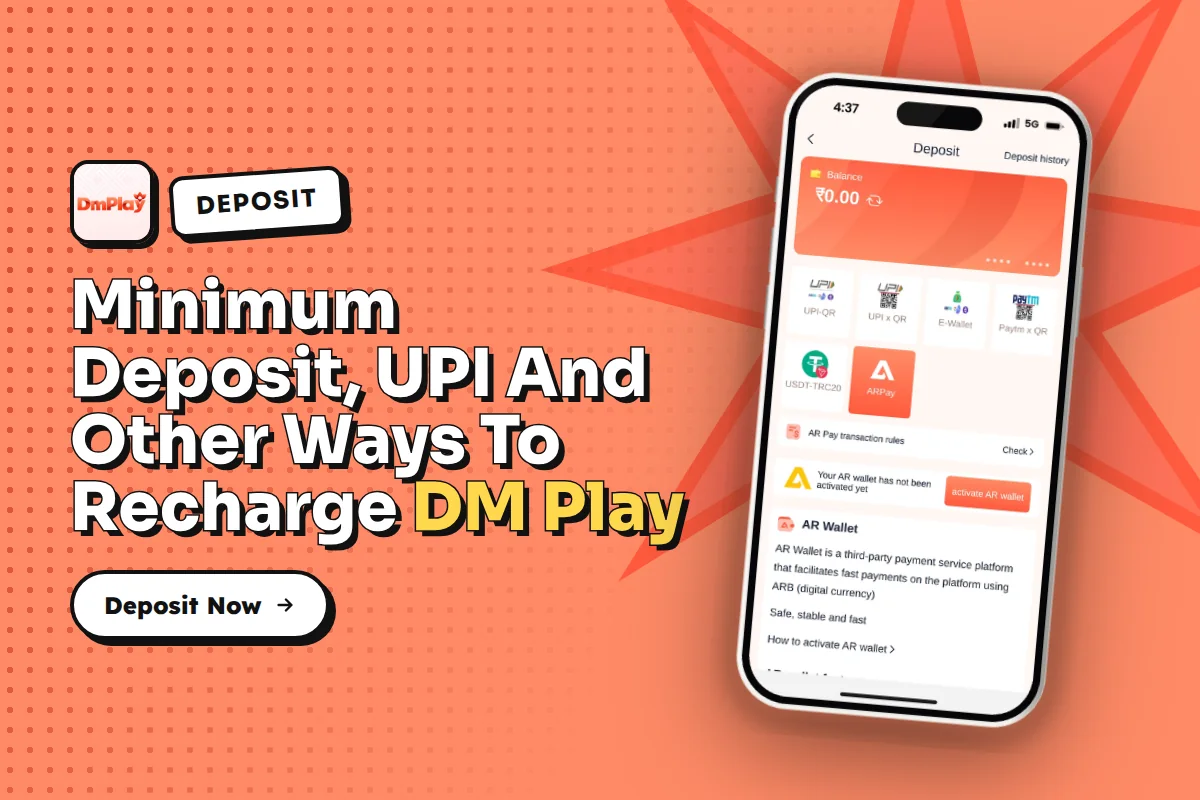
Most failed recharges come down to small errors, such as sending a sum that doesn’t match the order or cancelling the order after paying. Here you will find the exact steps, the limits for each method, the USDT minimum that appears differently on two pages, and how the first deposit bonus gets applied.
Playing games for real money carries genuine risk, and only people aged 18 or above are allowed to take part. Since rules differ from one Indian state to another, check the law in your own state before you add funds.
How Does A DM Play Deposit Work?
You recharge by creating an order inside your account and then paying exactly that amount. The order is the key part: the system matches your payment to the order you created, and that match is what moves money into your wallet balance for any deposit request.
In the app you will see six recharge ways after you tap Deposit. Do not let the number confuse you. Most of these tiles are simply different UPI collection QR codes on the deposit page, and the rest is USDT. So in practice you choose between UPI and USDT.
For most players in India, UPI is the simpler option because any UPI app can complete the payment. USDT suits people who already hold crypto and can send it from their own personal wallet. If you have never sent USDT before, start with UPI.
Steps To Make A DM Play Deposit Through UPI
You need to be logged in before you can recharge. If you do not have an account yet, follow the registration steps first and use invite code 216651031605 when the form asks for a recommendation code.
Tap ACCOUNT at the bottom of the DM Play App or mobile website.
Tap DEPOSIT to see the six recharge ways on offer.
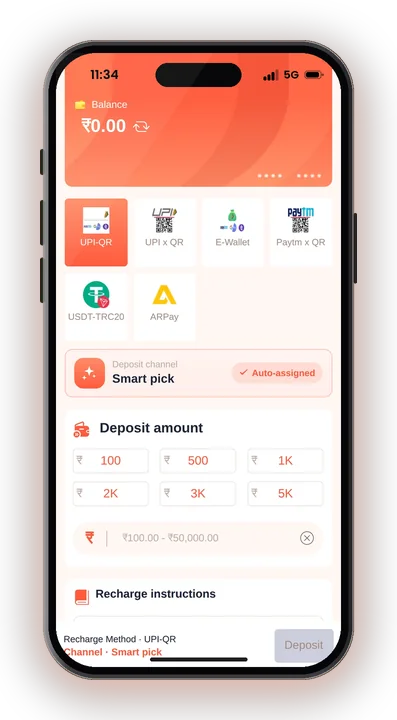
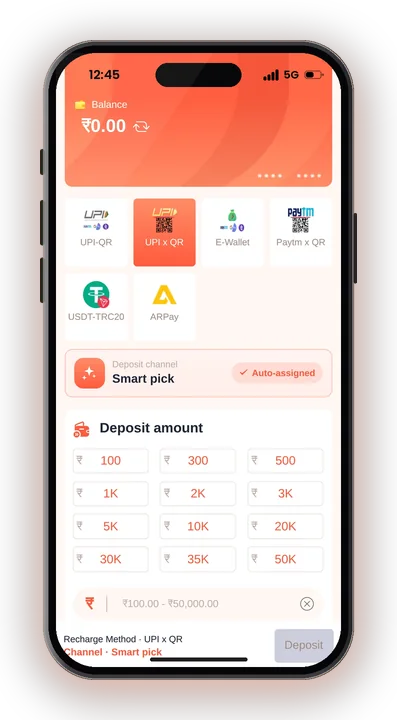
Choose any UPI tile. They all take a normal UPI payment, so pick the one that loads fastest for you.
Type an amount between ₹100 and ₹50,000 and create the order.
Scan the QR code, or open your UPI app, and pay the exact amount displayed on the order. Do not round it up or down.
Once you have paid, leave the order as it is and do not cancel it. Just wait until your wallet balance shows the update.
Save a screenshot of your UPI payment with the transaction reference number. If the money does not show, this is the first thing customer care will ask for.
DM Play Minimum Deposit And Maximum Limits
The minimum UPI deposit is ₹100 and the maximum for one UPI order is ₹50,000. For USDT, the deposit page sets the minimum at 10 USDT.
| Method | Minimum | Maximum | Note |
|---|---|---|---|
| UPI | ₹100 | ₹50,000 per order | Pay with any UPI app |
| USDT | 10 USDT (deposit page) | Check the app for the current limit | Address page states 100 USDT |
To put in over ₹50,000 by UPI, place a second order once the first one has been credited. Avoid sending a single big payment against a smaller order, as the amounts will then differ.
Your playing budget should decide the amount, not the maximum on the screen. Start with a small recharge you are fully ready to lose, especially on your first day.
Which USDT Minimum Is Right, 10 Or 100?
The USDT deposit page says the minimum is 10 USDT, and anything below 10 USDT will not be credited. The USDT address page, however, states a minimum of 100 USDT. Both cannot be right at the same time.
Until this is cleared up, the safe move is to send at least 100 USDT if you use crypto, or ask customer care in the app which minimum applies today. Sending 10 USDT and finding out the higher rule was in force can leave your money stuck.
Always copy the wallet address shown on your own order page, and check the network the page names before you send. A wrong network or a typed address error cannot be reversed on the blockchain.
Why Is My DM Play Deposit Not Credited?
A deposit usually fails to show for one of three reasons: the amount did not match the order, the order was cancelled, or the payment was below the minimum. Each one has a simple fix.
Paid A Different Amount From The Order
The sum you send must match the order you placed exactly, otherwise the funds can’t be credited. Many players enter a rounded figure in their UPI app without realising it.
If this happened, contact customer care with your UPI reference number and order details. Next time, copy the amount straight from the order screen.
Cancelled The Order After Paying
Some players cancel because the balance does not update in the first few seconds. That breaks the link between your payment and your order.
Leave the order alone once you have paid. If it still has not updated after a reasonable wait, raise it with support instead of creating a new order for the same money.
Sent Less Than The USDT Minimum
A USDT deposit below 10 USDT will not be credited, even though the address page talks about 100 USDT. If you sent a small test transfer, ask support if it can be added, but do not expect it.
First Deposit Bonus And Other Recharge Rewards On DM Play
New users get a first deposit negative profit bonus on their first deposit. If your first deposit ends in a loss within 24 hours, the platform returns 2% of that loss as a bonus, up to a fixed cap shown on the Activity page.
See it as a small safety cushion and not a reason to make an extra DM Play deposit. When you lose, getting 2% back is a very small share, so it should not tempt you into a larger first recharge than you had planned.
The Activity page also lists a First Deposit Bonus, Daily Check-In, Attendance bonus, Wingo Win Streak and Download App Free Rs. 28, along with others. Bonus turnover terms are not clearly listed, so open each offer and read its rules before you count on the money from your DM Play deposit being withdrawable.
Tips Before Your First DM Play Deposit
A little care before you pay saves a lot of trouble later with any DM Play deposit, especially when you want to take money out.
Use Your Own Name From The Start
The account name you save with your first withdrawal gets locked, and every later withdrawal method must use that same name. Make payments from a UPI account in your own name so your deposits and withdrawals line up.
When you are ready to take money out, the DM Play Withdrawal page explains limits, timings and why a request can stay pending.
Ignore Hack And Predictor Offers
No DM Play Hack works. Any app or Telegram group that sells predictions, or asks you to deposit via its link, is a scam, and every round’s result is random.
Only recharge from inside your own account after DM Play Login, never through a payment link someone sends you.
Set A Playing Budget And Stick To It
Decide a fixed amount for the week, place small bets and stop when it is gone. Do not chase losses with a fresh recharge. You must be 18 or older to play, and real money can be lost.
DM Play Deposit – FAQs
What is the minimum DM Play deposit?
Through UPI the minimum is ₹100 and the maximum per order is ₹50,000. For USDT the deposit page says 10 USDT, while the address page says 100 USDT.
Can I pay with any UPI app?
Yes. All UPI options accept a normal UPI payment, so any UPI app works. Just pay the exact order amount.
What should I do if my recharge is not showing?
Do not cancel the order or pay again. Check that you paid the exact amount, then send your UPI reference number and order details to customer care inside the app.
Does the first deposit bonus apply to every deposit?
No. The negative profit bonus is for new users on their first deposit only. It returns 2% of a loss within 24 hours, up to the cap shown on the Activity page.
Summing Up
Recharging on DM Play comes down to two methods, UPI from ₹100 to ₹50,000 and USDT, and one firm rule: pay exactly what the order shows and never cancel it after paying. For USDT, confirm the minimum first because two pages disagree.
Keep your deposits small, use an account in your own name and treat any bonus as a minor extra. Play only if you are 18+, and when you are done reading, head back to DM Play to create your first order.